
Manual / Personalising the app
Your operators
- For
- a controller who works one operator's routes
- Status
- current
- Covers
- the Operator filter and its pin button, and My operators in ⚙ Settings → Startup
- Last checked against the app
09f9688(2026-11-18)
Most people here work a slice of the network rather than all of it. One setting narrows the app to yours, and this page is what it reaches and what it deliberately does not.
Your operators
Where the control is. In the Map Explorer's sidebar, under Routes, the Operator filter. Its collapsed summary shows what you have chosen — All operators when nothing is ticked, the name itself when one is, and 3 operators when there are more. Open it for a checkbox per operator, with All and Clear buttons above them, and a pin button at the foot.
Routes whose operator the app does not know are listed as Unknown / charter, which is a real choice in the list rather than a gap.
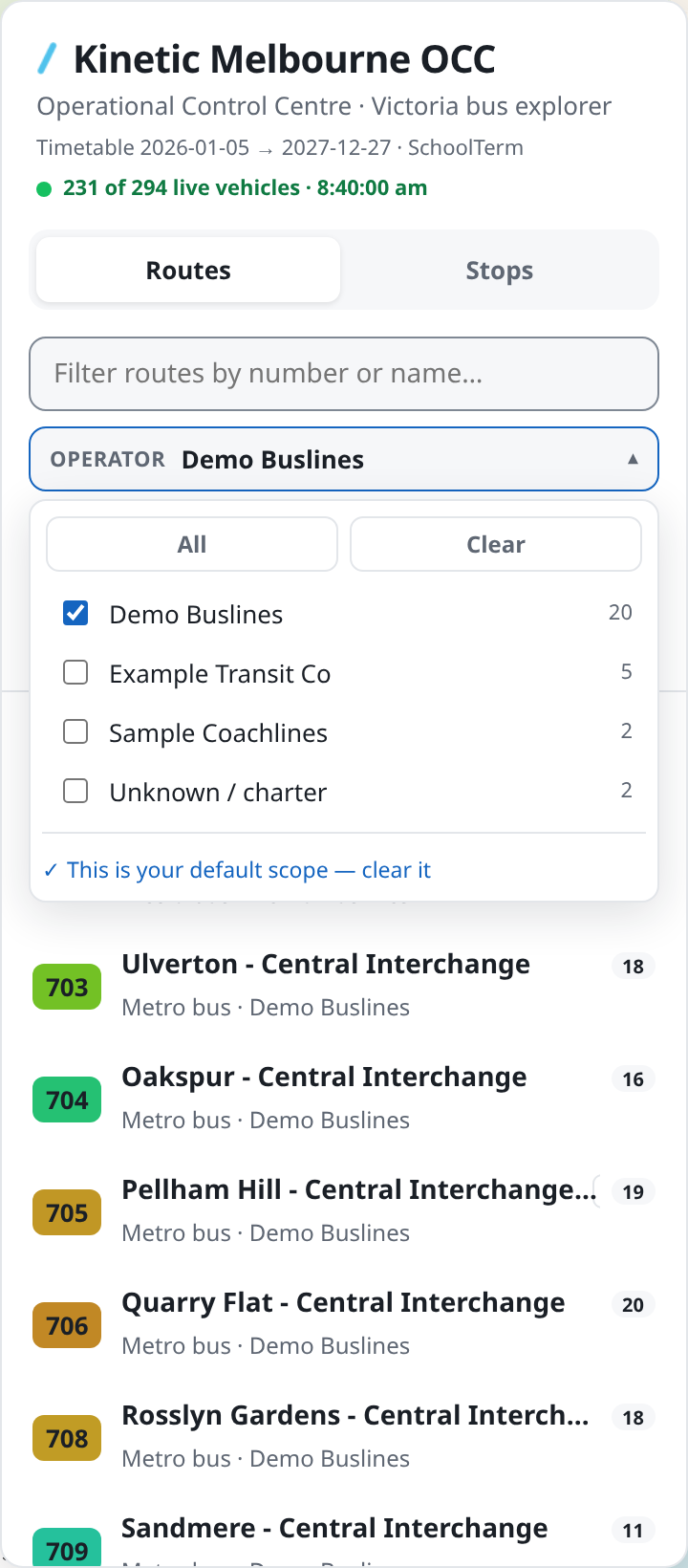
One scope, shared across tabs. Whatever you set here is also the scope the Timetable and the Diversions register start in. It is one answer to "my routes", not one per tab — before it was shared, the same person saw a different scope depending on which tab they opened first.
Making it your default. The pin button at the foot of the Operator menu is the bridge between this session and every future one. It reads:
| It says | What pressing it does |
|---|---|
| Make this my default scope | Stores what you have ticked as your default |
| ✓ This is your default scope — clear it | You are already on your default. Pressing it clears the default |
| Clear my default scope | Shown when nothing is ticked. Stores "no default scope" — see below |
Hovering it says where it is being kept: "Saved to your account, so it follows you to any browser", or "Saved in this browser (sign in to carry it across browsers)". A short message confirms each press.
The same value is in the panel. ⚙ Settings → Startup → My operators holds the same list, as names separated by commas. The filter is the comfortable way to set it; the panel is where you can see that it is set.
Why a fresh browser already has a scope
A user who has never chosen gets the operators this deployment is for, ticked in the filter, on their first visit. On a Kinetic control room's deployment that is Kinetic Melbourne — the bus operator, sitting in the same list as CDC Melbourne and Ventura.
It is seeded as a real, visible, editable preference and not as an invisible rule. It shows up ticked in the menu, it shows in the pin button, and clearing it sticks.
That is why "Clear my default scope" stores an empty answer rather than resetting the setting. "I want no default scope" has to outrank the seed, and only a stored answer can do that — resetting would remove your answer and let the seed apply again the next time you opened the app. It is the one deliberate exception to the rule on What Reset actually does.
Seeding happens once, and only on a cold start. Follow a link that says nothing about operators and the app leaves the filter alone, because the link is the sender's statement about what to look at and your defaults must not fill in its silences.
What they do not mean
A scope is a filter, not a permission. Nothing is hidden from you by setting it, and nothing is unlocked by clearing it. Press Clear, or All, and the whole network is back.
A scope does not change any number. It changes which routes are listed and which buses are drawn. A count on screen counts what is in scope and says so — the live line reads N of M live vehicles when your filter is hiding the difference, so the total is never lost.
"All operators" is not "no filter applied to the live map". It is the absence of an operator filter specifically. A selected route, a switched-off layer or a zoom are separate, and they all still apply.
Your scope does not travel in a link. A link carries whatever operator scope the sender had at the time. That is deliberate: one link must show one map.